


I remember when my father bought his first calculator in 1976. It wasn’t even one of those fancy LED models; it was just a simple calculator that ran on two AA batteries. It had green numbers. He used it every evening to tally up his business accounts.
Before that, he relied on his Chinese abacus, which he used with remarkable speed and accuracy. He tried to teach me, but I was too slow.
But I was mesmerised by the calculator. Occasionally, he let me play with this electronic marvel, and I was convinced there was magic inside.
99999 x 12345 - 456789 = 1234030866.
I would do this for as long as I had the calculator.
I wouldn’t need to memorise the multiplication or division tables with this little machine again. This was the future!
We have always built tools to extend the reach of our minds and our intent, to help us think more clearly, work more efficiently, and create with greater freedom.
From counting with our fingers to developing the abacus (so that we have millions of fingers). From basic calculators to spreadsheets that changed how we worked with numbers and data, each innovation expanded the boundaries of what we thought was possible.
Writing has also taken the same evolutionary path: from scratching on bones and bamboo stripes to writing with a pen and paper. From typewriters to word processors, from libraries and physical books to search engines, Wikipedia, and now, AI. Each tool helped remove friction from the creative process, allowing us to focus less on form and more on meaning.
I see AI as an extension of my thinking, not a replacement for it. It isn’t here to write for me. It’s here to write with me, to sharpen my thoughts, to organise my ideas, and to help me say what matters most.
It brings me back to when I first saw an electronic calculator.
The Wrong Way to Think About AI
When I share with others that I write with the help of AI, I usually get one of two responses:
Isn’t that cheating?
Wouldn’t that make your writing sound fake?
The answer depends.
In 1976, I didn’t think using a calculator was cheating, but my teacher thought so. Schools tried to ban it. It was almost like, “How dare you even consider it?” You will never learn to do 16 x 23 and become stupid and unemployed.
By 1982, they allowed it with restrictions, and we had to learn to use a scientific calculator for our “O” level maths.
But writing should be hard
“There’s nothing to writing. All you do is sit down at a typewriter
and open a vein.” Ernest Hemingway
(Of course, with Perplexity, we now know that the quote is more accurately attributed to Walter Wellesley “Red” Smith in 1949.)
There is a strangely sacred struggle between the writer and the blank page: Writing should be a painful, solitary act, and anything that seems to make the process easier is almost viewed as betraying the craft. Writers should suffer.
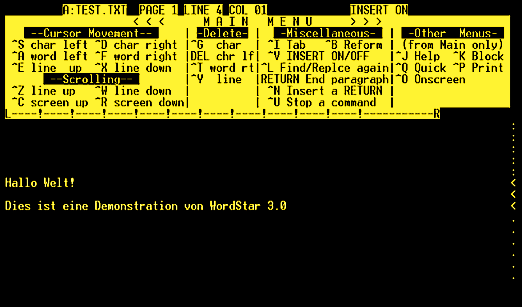
But this is the wrong way to think about writing, especially when writing with AI. I remember when those who used mechanical typewriters frowned upon dedicated electronic word processors (without a computer screen). At the start of my writing career in the mid-’80s, I bought a Smith-Corona, much to the displeasure of my other aspiring writer friends.
I dumped it when WordStar came along with the IBM 386 PC.
I see AI as my research assistant for fact-finding, confirming my theories and assumptions, and recommending sources I can reference. It is also my sounding board (so I am no longer solitary), who gives me opinions, criticises my ideas and thoughts, inspires me, and helps me overcome writer’s block. My drafting assistant, who helps me generate ideas that I edit or completely rewrite, because a better idea is triggered by reading AI’s ideas. My organiser, who helps me gather my thoughts and categorise them into outlines.
They all work quietly in the background, allowing me to focus on “the big idea.”
But some would let AI do everything. Write 20 articles on parental advice for toddlers with food allergies. Post them on my website.”
You can too; that’s not how I would use it.
Bad writing generated by AI happens when the thinking is unclear, the questions are lazy, or the prompts are poorly framed. In that sense, AI reflects the quality of attention you bring to your work. As with any tool, mastery comes from what you bring to it.
My Writing Process for What Matters
In this piece, I will share how I use a 5-step process when writing articles and books for this blog and The Intelligent Playbook (a dedicated AI newsletter). Feel free to modify and develop your own process that works for you.
My 5-Step Writing Process
Writing is, at its heart, the act of thinking and then expressing those thoughts through words.
AI helps me do this with greater clarity, structure, and discipline. It transforms the often messy writing process into something more intentional and methodical.
Over time, I’ve developed a simple but effective process for writing with AI. It keeps me focused, organised, and creative. Here’s how it works.
Step 1: Write the Prompt Before Writing
This is the most important step for me, and where I spend most of my time. I treat the prompt like the foundation of a building. It provides my GPT (Generative Pre-trained Transformer) with instructions and, more importantly, helps clarify my thoughts and intentions.
I have included a downloadable PDF template for Subscribers at the end of the article. Think of this template as your conversation starter with AI, a tool to help you clarify your ideas, refine your voice, and create writing that feels truly your own.
What do you want to do?
I want to write an article for tanfrancis. Of course, I can also write an article for The New Yorker or The Atlantic. Or my company’s web content or newsletter. The purpose is to let my GPT know the publication I am writing for. Tip: You can ask it to visit the URL to understand the publication.
Working Title or Topic:
This is a general statement, so my GPT knows what the article is about. A working title could be “Why I Have to Make My Bed Every Morning if I Want to Be a Millionaire Before I Turn 25.” You know immediately what the article is about, and so does your GPT.
Role Assignment:
I can assign a role to my GPT. I can ask that it act as the leading economist for the IMF in 2030 or as a Senior Consultant at McKinsey and Co, specialising in the geopolitics of Central Asia. I can even ask it to act as William Shakespeare suffering from writer’s block and trying to write his 155th sonnet before this Friday’s deadline. This gives the GPT context to work with.
I have also often asked my GPT to act as Francis Tan (me), trying to persuade my teenage son to make his bed every morning.
Be creative.
Setting the objective:
This is where I let my GPT know the goal. For example, I can tell my GPT that I am discussing the importance of climate change in 50 years or that I want to persuade the Mayor that having a 40-storey Ferris wheel, like The London Eye, here in our suburb is a bad, bad idea. Let your GPT know what you want to do: entertain, inform, educate, or explain.
Target Audience:
I will also tell my GPT who my audience is. Are they general readers? Professionals and executives? Prospective employers and HR Managers? My kids? My wife? Ex-girlfriends? You get it.
Desired tone:
One of the things I’ve learned is that I can guide my GPT to adopt a specific tone, whether conversational, formal, witty, serious, or even a little stern when needed.
This matters because, like any good assistant, it sometimes wanders off. It might drift into a style that doesn’t sound like me. When that happens, I simply remind it to stay in this voice, keep to this style, and return to this tone.
It’s not so different from working with a human editor or junior writer. You guide, you correct, you shape. After all, AI doesn’t know who I am until I teach it.
Key Message:
This is the single-minded proposition that I learned as a copywriter for an advertising agency. What is the one idea that I want to get across? Not two or three.
While I usually have more room than a 30-second radio commercial, I try to keep to just one key message. I do not always succeed. Continuing with our example, it can be: “If I want to be successful, I must begin with making my bed every morning to build discipline.”
Article Details:
Here’s where I include bits and pieces that might be helpful to my GPT. There is no fixed structure, but I find these helpful for my GPT and me.
Writing the super prompt forces me to clarify my thoughts, give good instructions, and know what I want to say. AI can’t think for me, but it can respond incredibly well when I know how to ask.
Step 2: Generate the Outline
Once I’ve finalised the prompt, I will ask the AI to generate an outline. I see this as the structure for my piece, a blueprint. This is especially useful for writing a long piece or even a book. An outline lets me plan how I want the piece to flow, what to cover and the details that go into it. Depending on the information I provided earlier, I can usually get a reasonably good draft to start working on.
Like a roadmap or agenda for a meeting with my editorial team.
Sometimes I need to revisit and refine my prompt several times, or as often as necessary, until the outline feels right.
Step 3: Edit the Outline.
This is the stage where I spent the most time. Think, comment, and edit. This is also where the writing happens
I go through the outline point by point and subpoint by subpoint, changing details and adding notes. I include personal stories and observations, quotes and jokes, move sections around, rewrite headings, and drop entire paragraphs.
“This is too generic. Replace it with my story about the old rickshaw driver we met in Jieyang.”
“I like how this paragraph flows. Maintain this warm and reflective tone throughout.”
“Expand this point. Include a placeholder for my story about how Paul cheated me out of my investment.”
“Section 3 feels repetitive. Merge with sections 1 and 7.”
“Include a quote from Confucius here. I want to bring some Chinese philosophy into this argument.”
“Include joke about the psychiatrist and proctologist going into business together.”
These comments make the article unique.
This is also the most rewarding part. Once I’m happy with the outline, I move on to the next stage.
Step 4: Flesh Out the Article
This is where AI happens and where many feel uncomfortable about it.
With the final outline, I ask the AI to flesh out the article or book section by section. I’ve learned that AI works best when it’s not overwhelmed. Trying to write everything in one go usually leads to disjointed ideas, a lack of focus, and hallucinations. So, take it one step at a time.
Once the section is written, I go through it. Read it for grammar, tone, structure, and clarity. Does it sound like me? Is it the right voice? Is it communicating the idea clearly?
If I don’t like something, I adjust it. Maybe I’ll ask to revise a sentence or suggest a different metaphor. Maybe I’ll add more detail from my personal experience.
I think of this as sculpting. AI might give me the raw material, but I get to work on it and refine it.
I continue this process, working through the entire article one paragraph at a time, refining, adjusting, and adding myself into the piece.
Sometimes, when a section takes an unexpected turn, I’ll see if this new path is worth exploring. That’s the beauty of writing with AI; there are always surprises and room for improvement.
It’s not just AI’s words or mine when I finish writing the whole piece. It’s a mix of both.
Step 5: Final Review. Reading, Refining, and Reflecting
Once I have a complete draft, it’s time for the final read-through.
This is where AI takes a back seat. I read it for clarity, structure, flow, meaning, and impact. This usually also involves breaking a few grammatical rules and conventions to make it more “me”.
This is where I sometimes make big adjustments, such as dropping entire sections, condensing or expanding sections, or rewriting the whole article. I feel it is less traumatic if I have to do that, knowing that I did not just waste an entire week on this. Having AI assist the process meant it took about half a day or more to reach the final draft. This improved efficiency means I can write more often without being too discouraged.
Once I’ve made the final adjustments and feel confident, I take a deep breath and hit publish.
AI as a Writing Partner
I’ve discovered that writing with AI has been more than just a time-saver. It has become a valuable tool for developing, organising, and refining my thoughts. Reading something I don’t like also clarifies what I do like. As a sounding board, AI offers different perspectives and helps me see my ideas from angles I might not have considered. This back-and-forth has been one of the most interesting and useful aspects of using AI-assisted writing.
Remember this: AI doesn’t care about the content. It doesn’t have opinions, emotions, or experiences. It works by recognising patterns in vast amounts of data. AI generates text based on probability and context, using past information to predict the next word or phrase. It is an efficiency machine designed to enhance speed and to extrapolate. But, importantly, it is not a thinking or feeling machine. It mimics human behaviour very well but lacks the depth of true consciousness. The kind that gives us soul, creativity, and emotion.
Perhaps that’s part of why we are afraid of it. AI can seem almost like a mirror of us, reflecting our ideas and style, but it is still fundamentally different. It doesn’t live, breathe, or dream. Not yet, anyway.
Let’s learn to work with it for now. Let’s embrace its potential to improve our lives, just as we did with earlier technologies. The calculator and the personal computer saved us countless hours and expanded possibilities. AI holds that same promise, but only if we let it.

Francis makes a good case for the efficiency of writing alongside AI while keeping the authors creativity and ability to craft content and tone